
Your next move.
Now on Android.
Keep your tasks, proofs, rankings, and agency updates within reach. Use your existing member account.
 DAUNTLESS
Follow the pictures, step by step.
Gabay sa pag-install · Eight illustrated examples and a Play Protect screenshot. Your phone may look different. Tap any picture to enlarge it.
Download the app

Example screen · Tap to enlarge ↗ Open this page in Chrome or your phone’s browser. Tap Download Android app above and wait for the download to finish.
I-tap ang download button at hintaying matapos.Open the downloaded APK

Example screen · Tap to enlarge ↗ Tap the completed download, or find Dauntless-Meyora.apk in your browser’s Downloads or your phone’s Files app.
Buksan ang Dauntless-Meyora.apk sa Downloads.Tap Settings if asked

Example screen · Tap to enlarge ↗ If Android says this source cannot install apps, tap Settings in that message. If no message appears, continue to step 5.
Kung may permission message, i-tap ang Settings.Allow this source

Example screen · Tap to enlarge ↗ Enable Allow from this source for the browser or Files app that opened the APK. Press Back to return to the installer.
I-on ang Allow from this source, tapos bumalik.Tap Install

Example screen · Tap to enlarge ↗ Tap Install and wait for installation to finish. If you already have Dauntless, install the update over your existing app.
I-tap ang Install at hintaying matapos.If Play Protect warns you
Optional · Only if this warning appears
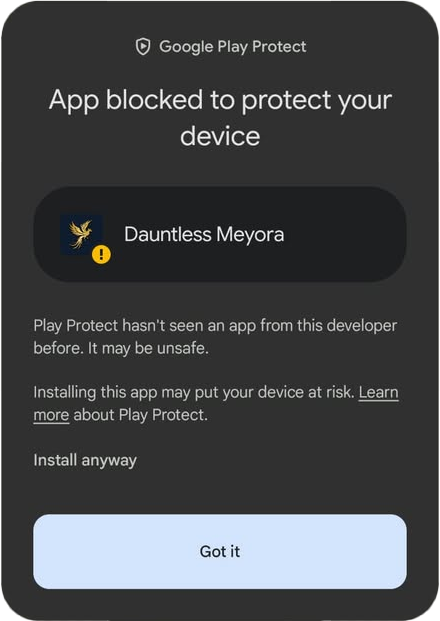
Play Protect screenshot · Tap to enlarge ↗ If this warning appears during installation, confirm the APK is the agency’s original signed file from its official website. If you trust that verified file, tap Install anyway. Otherwise, tap Got it and contact the administrator.
Keep Play Protect enabled. This screenshot does not prove that an APK is safe. If no warning appears, continue to step 6.
Kung may warning, tiyakin muna ang APK at pinanggalingan nito. Kung hindi ka sigurado, i-tap ang Got it at makipag-ugnayan sa admin.Open Dauntless

Example screen · Tap to enlarge ↗ Tap Open after installation finishes. You can also find Dauntless Meyora in your phone’s app list.
I-tap ang Open para buksan ang app.Log in to your account

Example screen · Tap to enlarge ↗ Enter your existing username or Poppo ID and password. Submit the login form to receive an email verification code.
Gamitin ang dati mong username o Poppo ID at password.Enter your email code

Example screen · Tap to enlarge ↗ Check your registered email, including Spam. Return to Dauntless, enter the newest six-digit code, then tap Verify. Keep your code private.
Ilagay ang pinakabagong email code, tapos i-tap ang Verify.
Download from the agency website. You can turn off “Allow from this source” after installation. Android installation help ↗
Need a hand?
Common questions before your first login.
Opening this link from Facebook or the GC?
If the download will not open inside Facebook or Messenger, use its menu to open this page in your phone’s browser, then try downloading again.
“App not installed” or a blocked installation?
Download the APK again and check that your phone has free storage. If an older Dauntless app is installed, update it without uninstalling. If the problem continues, send the exact message to the agency administrator. Keep Android’s security protection enabled.
Already have the app?
Download the latest version and tap Install to update your existing app. Future updates also appear inside the app when the agency publishes a new release. Android will ask you to approve installation.
Can I install it on an iPhone?
This APK is for Android phones. On an iPhone, use the agency website.
Where is my login code?
Use the email registered to your account. Check Inbox and Spam, and use the newest six-digit code. You can request another code from the app. Contact the agency administrator if you no longer have access to your registered email.
Ready when you are.
One account for your website and Android app.